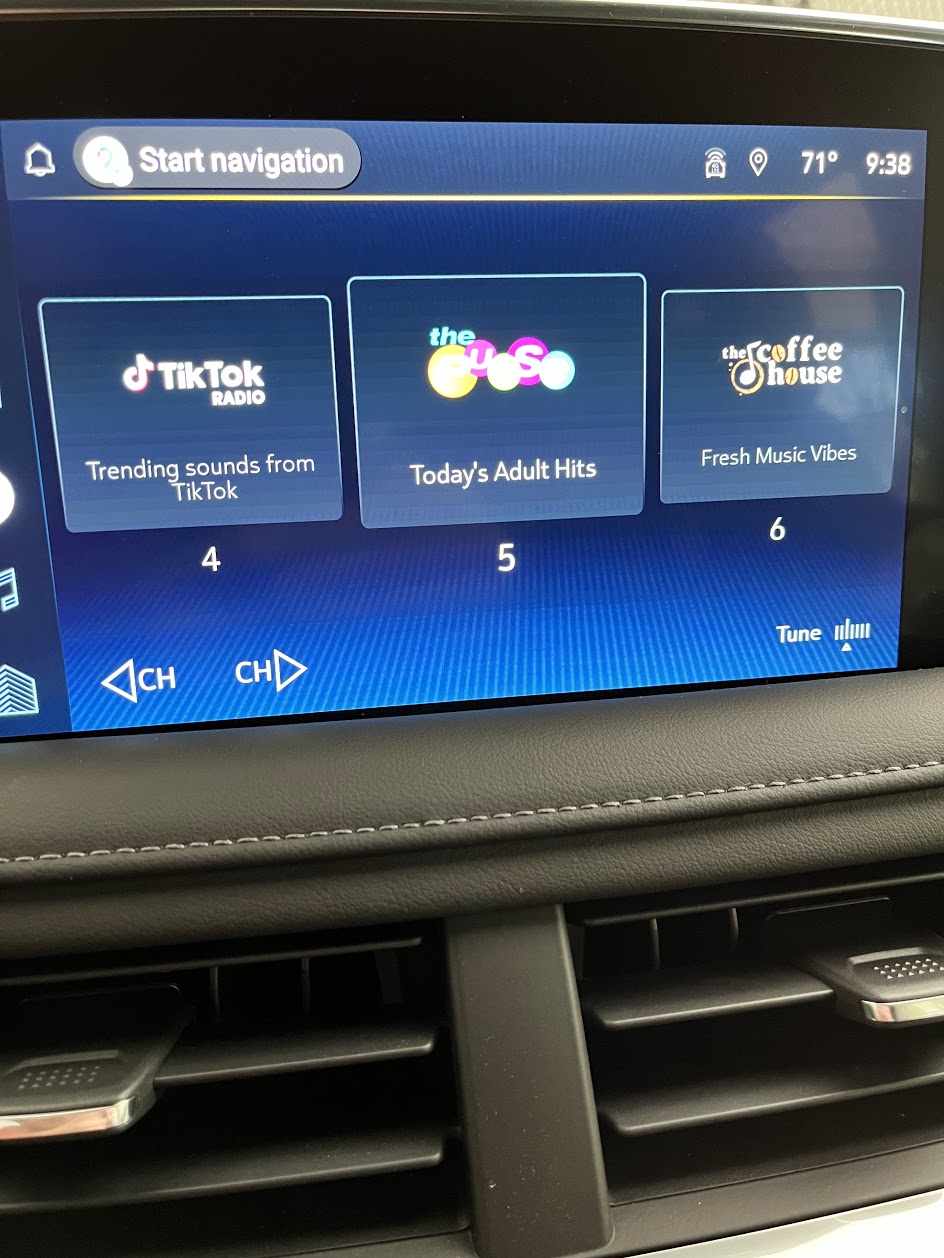
Is anyone else generally frustrated with the lack of thought put into the new Google powered infotainment system? There's many things that just don't make sense at all with the user interface and maybe the most frustrating one is the fact that when the passenger is tuning to a new station, it does not show you the artist/song immediately, it only shows the station name.

You are using an out of date browser. It may not display this or other websites correctly.
You should upgrade or use an alternative browser.
You should upgrade or use an alternative browser.
2022 Infotainment System Frustrations - Who designed this?
- Thread starter tahoe81
- Start date
Disclaimer: Links on this page pointing to Amazon, eBay and other sites may include affiliate code. If you click them and make a purchase, we may earn a small commission.
It sucks I hate it, have it on the new Silverado and it’s a downgrade from the previous system. How about that tuner button, That blows, I tried doing that while driving and my wife yelled at me, keep the physical buttons!!! The big screens are not the way to go
I work in tech and am all aboard the tech-train, but all things like this just seem rushed and zero thought put into how people may actually use the system. If it's just me, I can scroll through the channels with the button on the steering wheel and immediately see the artist/song, but don't you dare use the tuning knob under the screen... they'll only show you the channel and no artist/song.It sucks I hate it, have it on the new Silverado and it’s a downgrade from the previous system. How about that tuner button, That blows, I tried doing that while driving and my wife yelled at me, keep the physical buttons!!! The big screens are not the way to go
I guess my wife can just reach over and use the button on the steering wheel!


Garth Knight
Member
- Joined
- Jun 6, 2022
- Posts
- 93
- Reaction score
- 41
Which previous system? I'm about to be taking delivery of a '22 and I'm used to the old MyLink infotainment system that they used in 2014 models (Camaro).It sucks I hate it, have it on the new Silverado and it’s a downgrade from the previous system. How about that tuner button, That blows, I tried doing that while driving and my wife yelled at me, keep the physical buttons!!! The big screens are not the way to go
I had 2019 Silverado and I liked that system, was pretty simple. I like my new truck but almost wish I would have just bought out the 2019 sometimes instead of new lease.Which previous system? I'm about to be taking delivery of a '22 and I'm used to the old MyLink infotainment system that they used in 2014 models (Camaro).
And don't rely on a planned trip using Google Maps either. We traveled the whole month of July and Maps made so many errors driving right past pre-programmed stops more than once. You can download offline maps but after 24 hours or so they disappear so they are useless also. The whole system just sucks and of course the dealers nor GM support knows anything about these issues. I finally used my trusty Garmin Drivesmart 61 which never fails me.
2021 system was more user friendly...but was a one year release which is crazy to think about...switched over to the google interface and I really haven't seen anyone that likes the new system...
will say I wouldn't even try and use the maps app on the vehicle...just use carplay or android auto for your maps
will say I wouldn't even try and use the maps app on the vehicle...just use carplay or android auto for your maps
Stbentoak
Full Access Member
- Joined
- Jul 20, 2020
- Posts
- 2,255
- Reaction score
- 2,733
I just drove 1k miles in 3 days. The connected native navigation did great, alerted me to traffic jams, and the Alexa app found every place I wanted with one simple voice command. Kids streamed whatever they wanted off their phones on the RSE. Newer is not always better….
WalleyeMikeIII
Full Access Member
There are definitely bugs in this new system. I’ve had 3 updates so far, it is getting better; but the bugs do remain. Most irritating one is that sometimes after placing a call (iPhone/CarPlay active) the music source switches to car play after the call when it had been on XM prior to the call.
WalleyeMikeIII
Full Access Member
2nd Most Irritating Part is ther is no way to report the bugs to anyone....GM Connected Services people are not ready/trained to support tech like this and there is no way to send issues straight to Google. Dealers are useless (not because they don't want to help; my belief is the stuff isn't on the lot long enough for anyone at the dealer to get familiar with it; and there are no processes established to get the info to GM).
2021 system was more user friendly...but was a one year release which is crazy to think about...switched over to the google interface and I really haven't seen anyone that likes the new system...
will say I wouldn't even try and use the maps app on the vehicle...just use carplay or android auto for your maps
Yeah, the built in google maps system just doesn't seem quite ready for prime time yet. I find myself struggling to hear what commands are said (maybe the voice's tone is just weird?). I've been using CarPlay with Waze.
I just drove 1k miles in 3 days. The connected native navigation did great, alerted me to traffic jams, and the Alexa app found every place I wanted with one simple voice command. Kids streamed whatever they wanted off their phones on the RSE. Newer is not always better….
I'm confused... you said the built in was great for you but then "newer is not always better." Are you using the built in 2022 google navigation app? Maybe I've not used mine enough since I seem to default to using Waze, but I've not had the built in google maps alert me to traffic
Most irritating one is that sometimes after placing a call (iPhone/CarPlay active) the music source switches to car play after the call when it had been on XM prior to the call.
Yep, this is my biggest gripe with this system. I've got another thread open on the topic, actually. If I'm sitting at a stand still (I do every day picking up my kids from school), I may browse Reddit/Instagram or whatever. Any sound from the phone then changes the source from Sirius (where I usually have it) to CarPlay so the sound can then come out of the speakers in the car but once I stop browsing or close whatever was open, it doesn't change the source back to Sirius which it was on previously. In theory, I could just live in CarPlay and use the Sirius app from there, but it's garbage and doesn't easily allow you to change changes and browse stations.
WalleyeMikeIII
Full Access Member
The best part of using the Built In Google Maps or Apple Maps through car-play is that the turn and lane advice shows in the instrument cluster (and HUD if you have it). Generally agree, like Waze better...but the traffic info no Google Maps is great (assuming you have the Connected Services Plan active...)I'm confused... you said the built in was great for you but then "newer is not always better." Are you using the built in 2022 google navigation app? Maybe I've not used mine enough since I seem to default to using Waze, but I've not had the built in google maps alert me to traffic
Wow, really? I've never seen the turn information on the instrument cluster before and I've used the built in google maps a few times. Is there a certain screen you need to be on in the instrument panel for that to work? I'm usually on the screen that shows what radio station is playing.The best part of using the Built In Google Maps or Apple Maps through car-play is that the turn and lane advice shows in the instrument cluster (and HUD if you have it). Generally agree, like Waze better...but the traffic info no Google Maps is great (assuming you have the Connected Services Plan active...)
An you're saying that works with built in Google app or Apple Maps via CarPlay but not Waze via CarPlay?
It sucks I hate it, have it on the new Silverado and it’s a downgrade from the previous system. How about that tuner button, That blows, I tried doing that while driving and my wife yelled at me, keep the physical buttons!!! The big screens are not the way to go
Aren't there physical buttons below the screen and on the back of the steering wheel?
Stbentoak
Full Access Member
- Joined
- Jul 20, 2020
- Posts
- 2,255
- Reaction score
- 2,733
My system is a 2021 system, that’s why I said newer (2022) is not always better. Also my system shows turn by turn instructions in the HUD and cluster also.Yeah, the built in google maps system just doesn't seem quite ready for prime time yet. I find myself struggling to hear what commands are said (maybe the voice's tone is just weird?). I've been using CarPlay with Waze.
I'm confused... you said the built in was great for you but then "newer is not always better." Are you using the built in 2022 google navigation app? Maybe I've not used mine enough since I seem to default to using Waze, but I've not had the built in google maps alert me to traffic
Yep, this is my biggest gripe with this system. I've got another thread open on the topic, actually. If I'm sitting at a stand still (I do every day picking up my kids from school), I may browse Reddit/Instagram or whatever. Any sound from the phone then changes the source from Sirius (where I usually have it) to CarPlay so the sound can then come out of the speakers in the car but once I stop browsing or close whatever was open, it doesn't change the source back to Sirius which it was on previously. In theory, I could just live in CarPlay and use the Sirius app from there, but it's garbage and doesn't easily allow you to change changes and browse stations.
ah gotcha. Well showing the turns in the cluster would be helpful. But the 2022 has a whole new instrument cluster (100% digital) I guess it wasn't possible for some reasonMy system is a 2021 system, that’s why I said newer (2022) is not always better. Also my system shows turn by turn instructions in the HUD and cluster also.
WalleyeMikeIII
Full Access Member
Yes, set it to the Nav display using the left/right arrows on right side of steering wheel (select the little pointer thing). Shows the compass and When active navigating (via built in, or Apple Maps using car play) your turn advice will be in the instrument cluster. Is also available in the HUD if you have it, need to be showing compass in the HUD to get it. This turn advice will not display from Waze via car play.Wow, really? I've never seen the turn information on the instrument cluster before and I've used the built in google maps a few times. Is there a certain screen you need to be on in the instrument panel for that to work? I'm usually on the screen that shows what radio station is playing.
An you're saying that works with built in Google app or Apple Maps via CarPlay but not Waze via CarPlay?
Last edited:
Hmmm. Thanks. I'll check again and report back. I cycled through all the menus yesterday trying to see if I missed it and I don't believe I have anything that says Nav display. I'll report back.Yes, set it to the Nav display using the left/right arrows on right side of steering wheel (select the little pointer thing). Shows the compass and When active navigating (via built in, or Apple Maps using car play) your turn advice will be in the instrument cluster. Is also available in the HUD if you have it, need to be showing compass in the HUD to get it. This turn advice will not display from Waze via car play.
WalleyeMikeIII
Full Access Member
See screen snap of pages 104-106 of your owners manual. It is possible you don't have this info screen turned on...but thought it was default.Hmmm. Thanks. I'll check again and report back. I cycled through all the menus yesterday trying to see if I missed it and I don't believe I have anything that says Nav display. I'll report back.
When you press the left right arrows, it scrolls through the various displays available in area 2 below, there is a little set of icons at the top, one looks like a gear, one is music notes, one is an "i" for the info pages, and one is a little arrow pointing up, like a North indicator. This last one is the Navigation display and will put a compass in area 2 if you are not active on a route, and the turn advice in there if nav is active (Builit in Google Maps, or Apple Maps via car play). When I get a chance, I will take a couple pics and post them.
Last edited:
Gotcha. That explains it. I know where the compass shows in the cluster. I evidently just didn't have a route in place at the time.See screen snap of pages 104-106 of your owners manual. It is possible you don't have this info screen turned on...but thought it was default.
When you press the left right arrows, it scrolls through the various displays available in area 2 below, there is a little set of icons at the top, one looks like a gear, one is music notes, one is an "i" for the info pages, and one is a little arrow pointing up, like a North indicator. This last one is the Navigation display and will put a compass in area 2 if you are not active on a route, and the turn advice in there if nav is active (Builit in Google Maps, or Apple Maps via car play). When I get a chance, I will take a couple pics and post them.
View attachment 378129
Thanks!
Similar threads

- Replies
- 23
- Views
- 8K


- Replies
- 4
- Views
- 12K

- Replies
- 17
- Views
- 4K
- Replies
- 13
- Views
- 10K

