
Diagnosing P0300 code & Camshaft Retard Offset Adjustment Using Torque App

Disclaimer: Links on this page pointing to Amazon, eBay and other sites may include affiliate code. If you click them and make a purchase, we may earn a small commission.

Richamos1

TYF Newbie
Joined
Jun 6, 2015
Posts
19
Reaction score
1
Location
Northwood Iowa
This post may help you if you have the dreaded P0300 code on our Vortec engines.

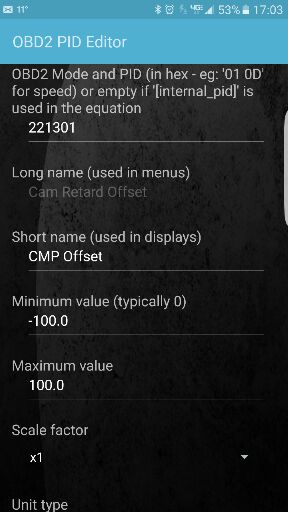
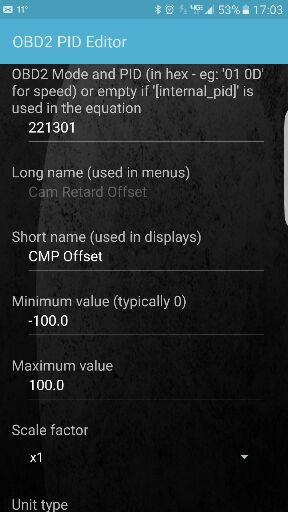
First you need the info to add the PID in the Torque App here are screenshots of the info you need to enter:
0b471ab4dfc85f0acbab3659e9b1144e.jpg


71b8741ef65daab44c3ab8d9d8728bba.jpg


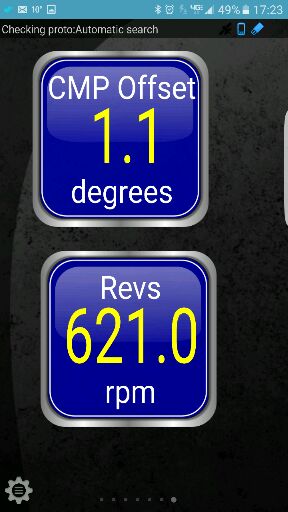
The part you don't see at the bottom is the OK button to save the PID. Once you save it by hitting OK, go to the main screen and select Realtime Info and swipe left or right til you find room to add 2 gauges. Hold your finger over the screen til you see Item Options menu and select Add Display. Next select Digital Display and scroll through the sensor options til you find and select Cam Retard Offset. Now move that display to the top or bottom so the rpm display you add will fit on the same screen. Same instructions apply for rpm except you select Engine RPM. When you're done it should look like this:
01b34f6c1824a496b63f7b3245fe0ba4.jpg


As long as you entered the info correctly setting up the PID your data should make sense. At 1000rpm my retard offset read 1.0 and I noticed when coasting at highway speed the CMP Retard data flatlined and the CEL flashed at the same time. Time to check out my distributor!

Hope this helps

Richamos

Sent from my SM-G935V using Tapatalk
 
OP
OP
Richamos1

Richamos1

TYF Newbie
Joined
Jun 6, 2015
Posts
19
Reaction score
1
Location
Northwood Iowa
This post may help you if you have the dreaded P0300 code on our Vortec engines.

First you need the info to add the PID in the Torque App here are screenshots of the info you need to enter:

0b471ab4dfc85f0acbab3659e9b1144e.jpg


71b8741ef65daab44c3ab8d9d8728bba.jpg


The part you don't see at the bottom is the OK button to save the PID. Once you save it by hitting OK, go to the main screen and select Realtime Info and swipe left or right til you find room to add 2 gauges. Hold your finger over the screen til you see Item Options menu and select Add Display. Next select Digital Display and scroll through the sensor options til you find and select Cam Retard Offset. Now move that display to the top or bottom so the rpm display you add will fit on the same screen. Same instructions apply for rpm except you select Engine RPM. When you're done it should look like this:

01b34f6c1824a496b63f7b3245fe0ba4.jpg


As long as you entered the info correctly setting up the PID your data should make sense. At 1000rpm my retard offset read 1.0 and I noticed when coasting at highway speed the CMP Retard data flatlined and the CEL flashed at the same time. Time to check out my distributor!

Hope this helps

Richamos

Sent from my SM-G935V using Tapatalk

Sorry here's the second pic for the PID info

0241fdcfd9616f8731ae2fbe824aac30.jpg


Sent from my SM-G935V using Tapatalk
 

drakon543

Full Access Member
Joined
Feb 15, 2016
Posts
2,473
Reaction score
1,722
Successfully replaced 3 faulty distributors on the vortecs within a year so far without the use of a scan tool. First one was my tahoe when i first bought it. Second was a pain because the owner had removed the original distributor before contacting me. Last was back to my tahoe recently as the first time i chose a cheap cardone reman distributor the first time.
 
OP
OP
Richamos1

Richamos1

TYF Newbie
Joined
Jun 6, 2015
Posts
19
Reaction score
1
Location
Northwood Iowa
Successfully replaced 3 faulty distributors on the vortecs within a year so far without the use of a scan tool. First one was my tahoe when i first bought it. Second was a pain because the owner had removed the original distributor before contacting me. Last was back to my tahoe recently as the first time i chose a cheap cardone reman distributor the first time.
You've been successful by not getting the P1345 code, but there's no guarantee it's dead on accurate. The retard can be as much as 17 degrees off before the code will set.

Sent from my SM-G935V using Tapatalk
 
OP
OP
Richamos1

Richamos1

TYF Newbie
Joined
Jun 6, 2015
Posts
19
Reaction score
1
Location
Northwood Iowa
what documentation says 17°?
My apologies to the group about throwing out that 17 degree number. No GM procedures or manuals state this number. I took that info from another forum site. The point of my post was to state the importance of properly setting the offset.

Sent from my SM-G935V using Tapatalk
 

drakon543

Full Access Member
Joined
Feb 15, 2016
Posts
2,473
Reaction score
1,722
The first time i dropped it in i ended up dead on 0. Buddy was playing around with his snap on toy he got. The going idea ive been told and read is it has to be between + or - 2 from 0 or you get p1345.
 

SunlitComet

OBS Jedi-Do Good
Joined
Sep 30, 2010
Posts
16,206
Reaction score
188
Location
unknown at this time.
that is absolutely correct. no matter what speed your engine is at it can always read the difference and can pick up on a hold down working loose and the dizzy drifting. When it sets it off is determined by per-requisites programmed in the the operating system.
 
OP
OP
Richamos1

Richamos1

TYF Newbie
Joined
Jun 6, 2015
Posts
19
Reaction score
1
Location
Northwood Iowa
The strange thing about mine is I am reading between .9 and 1.2 but very steady the value stays consistent, but when the CEL flashes the offset reading drops out completely. I'm guessing the value is outside of the parameters set when I programmed the PID.
 

SunlitComet

OBS Jedi-Do Good
Joined
Sep 30, 2010
Posts
16,206
Reaction score
188
Location
unknown at this time.
if it is flashing that is an active misfire and could be caused by i number of issues. when that happens some data is unreliable. could be random sensor failures or cable leakage and so forth.
 
OP
OP
Richamos1

Richamos1

TYF Newbie
Joined
Jun 6, 2015
Posts
19
Reaction score
1
Location
Northwood Iowa
if it is flashing that is an active misfire and could be caused by i number of issues. when that happens some data is unreliable. could be random sensor failures or cable leakage and so forth.
With 201k on my limited i think I will pull the distributor and see what that looks like.

Sent from my SM-G935V using Tapatalk
 

eswarden

TYF Newbie
Joined
May 8, 2013
Posts
22
Reaction score
1
I put in the formula exactly like the pictures show, but still cannot get a reading on the torque app
 

TahoeInFC

Member
Joined
Jun 6, 2014
Posts
72
Reaction score
6
Location
Fort Collins, CO
Hi All, I know this thread is a little over a year old, but I was curious enough to try this CMP retard calculation in my copy of TorquePro. I get a value for CMP, but it's -4.5 degrees nominal, and varies from about -4.4 to -4.7 during driving. While it's a number in the right order of magnitude, I was under the impression that 0 +/- 2 degrees was enough to trigger a P1345 code on my 99 Tahoe 5.7. I'm not getting any codes, so I question the accuracy of the reading. I checked and double-checked that I entered the equation and hex properly. It all looks right.
Anyone else try this successfully?
 

largewon62

Member
Joined
Aug 7, 2012
Posts
33
Reaction score
0
Hi All, I know this thread is a little over a year old, but I was curious enough to try this CMP retard calculation in my copy of TorquePro. I get a value for CMP, but it's -4.5 degrees nominal, and varies from about -4.4 to -4.7 during driving. While it's a number in the right order of magnitude, I was under the impression that 0 +/- 2 degrees was enough to trigger a P1345 code on my 99 Tahoe 5.7. I'm not getting any codes, so I question the accuracy of the reading. I checked and double-checked that I entered the equation and hex properly. It all looks right.
Anyone else try this successfully?
It could be the distributor gear being worn that causes that. The Vortec engines are known for eating distributor gears.
 

TahoeInFC

Member
Joined
Jun 6, 2014
Posts
72
Reaction score
6
Location
Fort Collins, CO
Thanks for the response!

I suspect that you're right, given my tahoe has a little over 150k on the counter. I think it's still the original distributor, so is probably somewhat worn. But still curious as to why a fault code isn't being thrown, giving me a CEL. With this much CMP retard offset, it seems like the vehicle would be complaining by now, right?

Sent from my SM-G920T using Tapatalk
 

Jerry Blueburban

TYF Newbie
Joined
May 18, 2018
Posts
1
Reaction score
0
New to this page. I am using a BAFX Products Bluetooth Diagnostic OBDII Reader / Scanner for Android Devices with Torque pro. I need to adjust my cam retard and set up a custom PID to match the one at the top of this page and I get no response back. Can someone please tell me what I am doing wrong or what I need to do to get this to function properly. Thank you.
 

TahoeInFC

Member
Joined
Jun 6, 2014
Posts
72
Reaction score
6
Location
Fort Collins, CO
New to this page. I am using a BAFX Products Bluetooth Diagnostic OBDII Reader / Scanner for Android Devices with Torque pro. I need to adjust my cam retard and set up a custom PID to match the one at the top of this page and I get no response back. Can someone please tell me what I am doing wrong or what I need to do to get this to function properly. Thank you.

Jerry, I am also using Torque Pro, and with the screenshots in the Posts #1 and 2, it just started working after I added the new PID and the new 'Realtime Information' gauge that points at the new PID.
Admittedly, the first time it wouldn't work for me, because I had messed up one of the hex codes in the screenshot, but after I found and fixed it, it started to work. I mis-typed the first number (221301) and got complete garbage until I fixed it. I'm using a WiFi OBDII adapter instead of bluetooth, but that shouldn't make any difference...as long as it's communicating with your truck. I'm guessing you've verified all the hex codes and formula in the screenshots? Are you getting good communication with your car using the app and the adapter? You'll know this when the adapter and 'car' icons in the top left-hand corner of the torque pro screen stop blinking, and when the big gauge in the main screen of the torque app starts displaying your vehicle's tach instead of something like 'Accel' (which is only monitoring the accelerometer in your phone or tablet until your car connects).

You've probably already tried all this, but hope it helps!
 

Get Bent

TYF Newbie
Joined
Feb 8, 2017
Posts
17
Reaction score
0
If you change the multiplier from 0.024 to 0.063, the readings returned will be more accurate the further from 0 degrees you get.

Using the formula with the multiplier 0.024 I was getting a reading of 0.6 degrees. I bought the Dash Command app with the Cam retard PID and it returned a value of 1.6 degrees. I was a full degree off and almost out of spec. I then modified the multiplier to 0.063 and the returned values were identical between the two apps. I readjusted my distributor and now have full confidence everything is set correctly.
 

Mista Jey

TYF Newbie
Joined
Aug 4, 2020
Posts
1
Reaction score
0
I double checked I put it in right, but still not showing active or any reading. I've got a 96 GMC K2500 with the 7.4L. any help would be great.
 

C17FXR

TYF Newbie
Joined
Dec 13, 2013
Posts
15
Reaction score
18
If you change the multiplier from 0.024 to 0.063, the readings returned will be more accurate the further from 0 degrees you get.

Using the formula with the multiplier 0.024 I was getting a reading of 0.6 degrees. I bought the Dash Command app with the Cam retard PID and it returned a value of 1.6 degrees. I was a full degree off and almost out of spec. I then modified the multiplier to 0.063 and the returned values were identical between the two apps. I readjusted my distributor and now have full confidence everything is set correctly.

I had to change the worm gear on the bottom of my distributor so I thought I'd give this a try.
I'm using a PLX Kimi 4 bluetooth adapter and Torque Pro version 1.10.114.
I was getting the P1345 at start up even after resting the code, adjusted my distributor until I got the numbers in the screen shot, funny thing the P1345 code has not returned but the numbers are not correct.
Guess I'll be getting the Palmer Performace just to make sure I get it set correctly.

As you can see I set a screen for both multipliers and you can see the results. The top screen was the 0.024 multiplier and the one on bottom was the 0.063 multiplier.
Screenshot_20200813-195032_Torque.jpg
 

Forum statistics

Threads
138,092
Posts
1,998,715
Members
103,016
Latest member
BadDaddy2003
Back
Top