Tech 2 help

Disclaimer: Links on this page pointing to Amazon, eBay and other sites may include affiliate code. If you click them and make a purchase, we may earn a small commission.

latvius

Full Access Member
Joined
Nov 17, 2014
Posts
581
Reaction score
986
Location
Ariton Alabama
I have a tech 2 but finding simple instructions on how to use it eludes me.
My blend door doesn't want to work. I have replaced the actuator now the brand new one doesn't move. Lower actuator to be precise I wanted to use the tech 2 to tell it to move but can't figure out how.

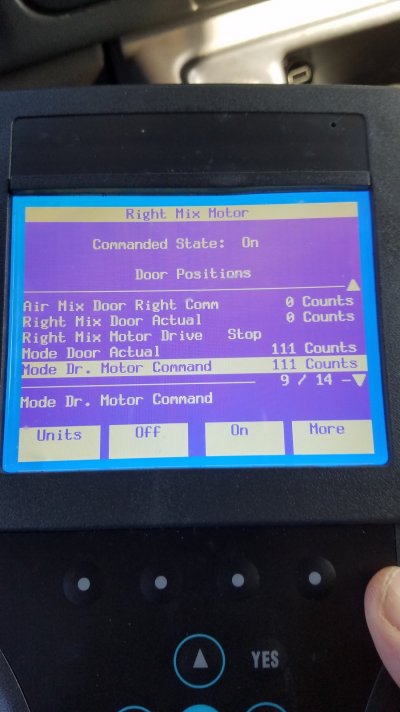
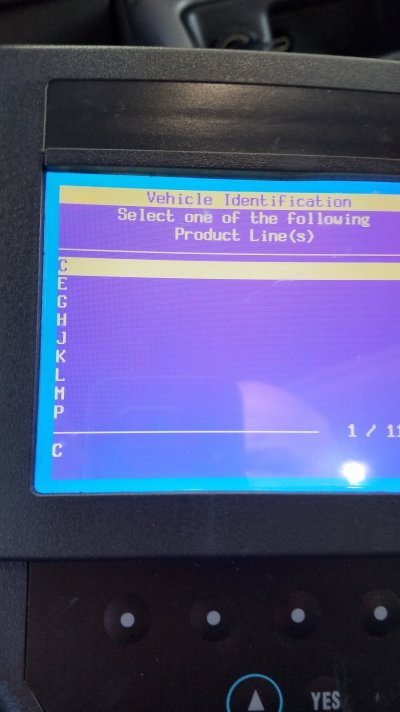
So my questions are on the pic I took
Should I be in diagnostics? What letter do I pick for a 2005 Tahoe?
I got to the section with all the actuators but have no idea what to do from there.

20241204_105953.jpg20241204_110359.jpg20241204_110418.jpg
 

Doubeleive

Wes
Supporting Member
Joined
Nov 7, 2017
Posts
30,501
Reaction score
47,903
Location
Stockton, Ca.
Are you 100% sure you got the right one? Some of the actuators look the same but don't work the same. So even though it will fit and plug in it won't work unless it's the right part number Best thing to do is to look at the old one you pulled out and match up the part number. If you really want to see if it's just not moving at all, just pull the HVAC fuse for a minute and then plug it back in and watch it this makes it recalibrate itself
 
OP
OP
latvius

latvius

Full Access Member
Joined
Nov 17, 2014
Posts
581
Reaction score
986
Location
Ariton Alabama
Select K for your tahoe.
Going by memory here so..
Diagnostics>Body control module> hvac

Post a pic of that menu
After hvac it asks if I have dual climate which I do and after I select that I get the screen with all the doors,blower, actuators in the picture I included
 
OP
OP
latvius

latvius

Full Access Member
Joined
Nov 17, 2014
Posts
581
Reaction score
986
Location
Ariton Alabama
Are you 100% sure you got the right one? Some of the actuators look the same but don't work the same. So even though it will fit and plug in it won't work unless it's the right part number Best thing to do is to look at the old one you pulled out and match up the part number. If you really want to see if it's just not moving at all, just pull the HVAC fuse for a minute and then plug it back in and watch it this makes it recalibrate itself
Well it replaces the one I got before which replaced the one I got before and maybe even one before that LOL so original part # is long gone. I've done the recalibrate several times, hence why I am trying to use a tech 2 to see what it is doing or at least what the computer thinks it is doing.
 

Fless

Staff member
Moderator
Joined
Apr 2, 2017
Posts
16,280
Reaction score
33,642
Location
People's Republic of Colorado
I have a tech 2 but finding simple instructions on how to use it eludes me.
My blend door doesn't want to work. I have replaced the actuator now the brand new one doesn't move. Lower actuator to be precise I wanted to use the tech 2 to tell it to move but can't figure out how.

So my questions are on the pic I took
Should I be in diagnostics? What letter do I pick for a 2005 Tahoe?
I got to the section with all the actuators but have no idea what to do from there.


View attachment 444097View attachment 444098View attachment 444099

Pick the 5th digit of your VIN. K=4wd, C=2wd

Like the start of this one: 1GNEK13R
 
OP
OP
latvius

latvius

Full Access Member
Joined
Nov 17, 2014
Posts
581
Reaction score
986
Location
Ariton Alabama
Found this doc, so if I read this right I need to go to
A/C Mix Door – Body > Heating and Air Conditioning > Special Functions > Output Test
And I guess this will make the mix door move (which I guess is the hot/cold blend door)

Another question am I supposed to have the vehicle running or no? Or does it matter?
 

Attachments

  • GM_Tech2_Paths.pdf
    1.7 MB · Views: 39
OP
OP
latvius

latvius

Full Access Member
Joined
Nov 17, 2014
Posts
581
Reaction score
986
Location
Ariton Alabama
I got this far but then after I got lost going that route into a section I can't figure out. I found a YT series on tech 2 for dummies but it is for a saab, I will prolly watch it and see if I can learn anything.

20241205_102444.jpg
 

swathdiver

Full Access Member
Joined
May 18, 2017
Posts
21,276
Reaction score
30,208
Location
Treasure Coast, Florida
If you were to click on F2, then on that menu there would be functions above the hard buttons below the screen. Those would say to open or close or make it colder or hotter, etc.

So you press those to test the actuator and can see other lines showing it in action moving through 0-255 counts or 255-0 counts.

After installing the new actuator did you perform a relearn? I leave the engine running doing these tests so the battery doesn't go dead.

1733435052365.png
 
OP
OP
latvius

latvius

Full Access Member
Joined
Nov 17, 2014
Posts
581
Reaction score
986
Location
Ariton Alabama
Ok I just learned these are the function keys lol.
I'll go back in tomorrow and press f2 and go from there.
I haven't done a relearn from tech 2 was just disconnecting battery.


1733436141573.png
 
OP
OP
latvius

latvius

Full Access Member
Joined
Nov 17, 2014
Posts
581
Reaction score
986
Location
Ariton Alabama
Although those buttons are "hard" they're technically known as soft keys, since their functions change by what's shown above them on the screen.

They pair up with the screen info, like this:

View attachment 444210
I actually figured that part out but I ended up on that same screen and couldnt figure out where to go from there. I guess those counts are error counts?
 

Fless

Staff member
Moderator
Joined
Apr 2, 2017
Posts
16,280
Reaction score
33,642
Location
People's Republic of Colorado
I actually figured that part out but I ended up on that same screen and couldnt figure out where to go from there. I guess those counts are error counts?

No, not error counts. The "actual" count should closely match the "commanded" count; the actual is the position of the door. Compare the two associated positions and know that a small difference is okay. That tells you that the computer is commanding the door to be at "x" position and the actual should be close to the same number.

In your pic the mode door is only one count off of the commanded position (83 vs 82, respectively). Much joy!
 
OP
OP
latvius

latvius

Full Access Member
Joined
Nov 17, 2014
Posts
581
Reaction score
986
Location
Ariton Alabama
No, not error counts. The "actual" count should closely match the "commanded" count; the actual is the position of the door. Compare the two associated positions and know that a small difference is okay. That tells you that the computer is commanding the door to be at "x" position and the actual should be close to the same number.

In your pic the mode door is only one count off of the commanded position (83 vs 82, respectively). Much joy!
OK gotcha, that makes sense
 
OP
OP
latvius

latvius

Full Access Member
Joined
Nov 17, 2014
Posts
581
Reaction score
986
Location
Ariton Alabama
OK I learned some more, now what does the comand state on and off do or supposed to do?

20241206_101016.jpg
 
Last edited by a moderator:

Forum statistics

Threads
137,691
Posts
1,989,699
Members
102,690
Latest member
RobK

Latest posts

Back
Top