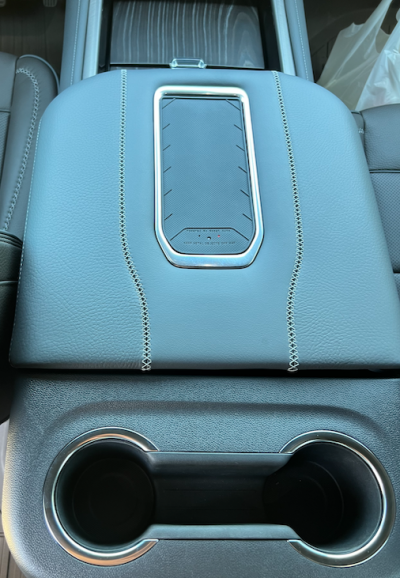
Another one on the Wireless Charger

Disclaimer: Links on this page pointing to Amazon, eBay and other sites may include affiliate code. If you click them and make a purchase, we may earn a small commission.

dancastro

Full Access Member
Joined
Aug 18, 2022
Posts
128
Reaction score
46
I've seen several threads citing issues with the factory wireless charging.
Typical problems are slow charging, intermittent charging ,etc.
I have a Samsung S23 (previous S9+). The charge rate is extremely slow (yes I removed the case).
Due to the constant intermittent charging issue the home screen is constantly waking up. This with the slow rate turns the charger into a maintainer! I get 2% or 3% with an hour on the charger.

As others have said, I've reverted to a cable.

The question is how widespread is this problem and what are our chances of getting a proper solution from GMC?
 

Micahsd

Full Access Member
Joined
May 6, 2021
Posts
354
Reaction score
167
I know my iPhone 12 charged fine wirelessly but my iPhone 14 Plus which is a little larger won’t charge worth a crap in my ‘21 Tahoe.

I’m not sure if it’s due to an alignment issue or if it requires more current. I’ll see it start to charge then it stops within maybe 20 seconds.

My vehicle has the latest updates as of a few months ago so I suspect this is just another case of electronics in the vehicle becoming obsolete too quickly which is super annoying. Similar to my infotainment system which is not the Google built-in version so that’s now outdated too.
 

Eusibius2

Full Access Member
Joined
Oct 3, 2021
Posts
212
Reaction score
146
Location
Chicago burbs
2022 Z71 6.2L.... Google Pixel 7pro

Occasionally will have issues with charging, but usually bc my phone is hot. Manual says that phone won't charge if the Temps are too high or some other condition isn't just right.

For the most part, no problems fast charging though and my OTAs are up to date.
 

Pro299

Full Access Member
Joined
Jun 17, 2021
Posts
127
Reaction score
95
I have a Samsung S21+ and it charges just fine in my 2021 even through the case.
 

Blueinterceptor

Full Access Member
Joined
Jan 20, 2016
Posts
1,157
Reaction score
686
I have iPhone pro max. No issues charging on either the 21 Tahoe or 23 suburban.
 

todayusay

Full Access Member
Joined
Aug 2, 2016
Posts
580
Reaction score
305
our 21 Yukon worked well with my S20+, not so much for the iphone 12 pro max thingy.

our 23's is pretty much non-functional as it charges for 5 seconds and then stops with all our phones.
 

SmokeyJoe

TYF Newbie
Joined
Jan 13, 2023
Posts
17
Reaction score
3
our 21 Yukon worked well with my S20+, not so much for the iphone 12 pro max thingy.

our 23's is pretty much non-functional as it charges for 5 seconds and then stops with all our phones.
I aslo have a S20+ and 22 Tahoe. As an experiment, I let the phone sit on the charger one day for an hour and a half. It didn't change the charging level at al.. It did cause the screen to turn on and off repeatdly. After it finally have me a warning that it was too hot, I abandonded the experiment. The phone is in case but if I take it out of the case, it still does not charge.
 

Eusibius2

Full Access Member
Joined
Oct 3, 2021
Posts
212
Reaction score
146
Location
Chicago burbs
Try an app like Ampere while it's charging on the wireless. The app will tell you how many amps are currently flowing and which direction (charging or discharging).
 

UsualSuspect

Full Access Member
Joined
Feb 21, 2022
Posts
263
Reaction score
176
Location
SoCal
I haven't had an issue with wireless charging, but the small area they give you, then someone else uses a USB to charge, makes it difficult to get my phone out. I ended up adding a charging pad to the console lid. Now we can charge 2 at a time without cables.
 
OP
OP
dancastro

dancastro

Full Access Member
Joined
Aug 18, 2022
Posts
128
Reaction score
46
I haven't had an issue with wireless charging, but the small area they give you, then someone else uses a USB to charge, makes it difficult to get my phone out. I ended up adding a charging pad to the console lid. Now we can charge 2 at a time without cables.
Where did you get the console pad & how do you like it?
 

UsualSuspect

Full Access Member
Joined
Feb 21, 2022
Posts
263
Reaction score
176
Location
SoCal
I purchased the Boost Auto. Both the wife and I use it more than the OEM one in the center console. We also found if you slide the console back, the folks in the rear seat can also use it. The install video is a bit flawed if you have the sliding console, or RES. If you have RES, there are 4 wires on the USB, not 3, but the pins are the correct ones to use. For the console itself, the wire routing shows a route, that if you use it, the rear tray that shows up when you use the lid for an armrest, can't be fit back in there. I just followed the OEM lid wiring path.
20230605144602.png
 
OP
OP
dancastro

dancastro

Full Access Member
Joined
Aug 18, 2022
Posts
128
Reaction score
46
Try an app like Ampere while it's charging on the wireless. The app will tell you how many amps are currently flowing and which direction (charging or discharging).
I downloaded the app & gonna give it a try.
Anybody know what the correct charge rate should be?
 

Eusibius2

Full Access Member
Joined
Oct 3, 2021
Posts
212
Reaction score
146
Location
Chicago burbs
I downloaded the app & gonna give it a try.
Anybody know what the correct charge rate should be?
It can vary... 1500 milliamps is "ok", 2500 milliamps is closer to today's consideration of Fast Charge. If you're in the mid hundreds, it's slow.
 

steiny93

Full Access Member
Joined
Feb 17, 2021
Posts
455
Reaction score
402
In a '21 Denali; wireless charging works but the phones overheat and quit charging due to high temp (samsungs). Those same phones are totally happy wirelessly charging on other chargers.

If I disconnect the phones from the truck they don't get near as hot. My guess is that they are doing android auto work which is sucking them dry on battery power.
 
OP
OP
dancastro

dancastro

Full Access Member
Joined
Aug 18, 2022
Posts
128
Reaction score
46
Thanks to Eusibius2 for recommending the Ampere app!
Downloaded and tested. The best I was getting is a couple hundred mAh, on an intermittent basis constantly going on & off. (Yes w/o the case).
Set up warranty service.
 
OP
OP
dancastro

dancastro

Full Access Member
Joined
Aug 18, 2022
Posts
128
Reaction score
46
Update.
Just got back from the dealer.
They removed the rubber pad over the charger, cut off the ribs from the bottom. (They said there was too much of a gap), then reinstalled the pad. Phone charged from 86% to 100% in 20 minutes.
Go figure!
 

iamlegion

Full Access Member
Joined
Jan 5, 2024
Posts
130
Reaction score
90
Update.
Just got back from the dealer.
They removed the rubber pad over the charger, cut off the ribs from the bottom. (They said there was too much of a gap), then reinstalled the pad. Phone charged from 86% to 100% in 20 minutes.
Go figure!
I know this reply is a bit late, but you can probably still improve your charging, if you want to try this.

First, backing up to explain why the grooves are there that your dealer cut off. GM vent AC air between the rubber phone mat and the wireless charging coil underneath to keep the charging unit and the phone from over-heating. When your dealer shaved those grooves off, they moved the phone closer to the coils which helps with charging but cut off the AC flow.

If you live in a cool climate or don't have much direct sunlight to where your phone sits, this may be irrelevant. If you do however live in a hot/sunny climate, if you pull your rubber charging mat out you can see where your vehicle has slot the AC air comes out. If you are willing, if you just notch that spot in the mat out with an razor blade the AC is more than sufficient to cool your phone off and let it charge at max speed more of the time.

You can even see this if you just pull out the rubber mat entirely and just lay your phone onto the spot where it should charge and leave it there. My phone + charger is 3x cooler to the touch w/o the mat there and charges faster than it ever did with it in place.
 
OP
OP
dancastro

dancastro

Full Access Member
Joined
Aug 18, 2022
Posts
128
Reaction score
46
I know this reply is a bit late, but you can probably still improve your charging, if you want to try this.

First, backing up to explain why the grooves are there that your dealer cut off. GM vent AC air between the rubber phone mat and the wireless charging coil underneath to keep the charging unit and the phone from over-heating. When your dealer shaved those grooves off, they moved the phone closer to the coils which helps with charging but cut off the AC flow.

If you live in a cool climate or don't have much direct sunlight to where your phone sits, this may be irrelevant. If you do however live in a hot/sunny climate, if you pull your rubber charging mat out you can see where your vehicle has slot the AC air comes out. If you are willing, if you just notch that spot in the mat out with an razor blade the AC is more than sufficient to cool your phone off and let it charge at max speed more of the time.

You can even see this if you just pull out the rubber mat entirely and just lay your phone onto the spot where it should charge and leave it there. My phone + charger is 3x cooler to the touch w/o the mat there and charges faster than it ever did with it in place.
Thanks for the info. That explains the cold air flow!! As an update, in the long run the fix did nothing for overall performance.
I know this reply is a bit late, but you can probably still improve your charging, if you want to try this.

First, backing up to explain why the grooves are there that your dealer cut off. GM vent AC air between the rubber phone mat and the wireless charging coil underneath to keep the charging unit and the phone from over-heating. When your dealer shaved those grooves off, they moved the phone closer to the coils which helps with charging but cut off the AC flow.

If you live in a cool climate or don't have much direct sunlight to where your phone sits, this may be irrelevant. If you do however live in a hot/sunny climate, if you pull your rubber charging mat out you can see where your vehicle has slot the AC air comes out. If you are willing, if you just notch that spot in the mat out with an razor blade the AC is more than sufficient to cool your phone off and let it charge at max speed more of the time.

You can even see this if you just pull out the rubber mat entirely and just lay your phone onto the spot where it should charge and leave it there. My phone + charger is 3x cooler to the touch w/o the mat there and charges faster than it ever did with it in place.
Thanks for the info. That explains the cold air flow! IN the long run, the dealer mod has no better results. I even took in to the dealer for TSB 22-NA-235
I know this reply is a bit late, but you can probably still improve your charging, if you want to try this.

First, backing up to explain why the grooves are there that your dealer cut off. GM vent AC air between the rubber phone mat and the wireless charging coil underneath to keep the charging unit and the phone from over-heating. When your dealer shaved those grooves off, they moved the phone closer to the coils which helps with charging but cut off the AC flow.

If you live in a cool climate or don't have much direct sunlight to where your phone sits, this may be irrelevant. If you do however live in a hot/sunny climate, if you pull your rubber charging mat out you can see where your vehicle has slot the AC air comes out. If you are willing, if you just notch that spot in the mat out with an razor blade the AC is more than sufficient to cool your phone off and let it charge at max speed more of the time.

You can even see this if you just pull out the rubber mat entirely and just lay your phone onto the spot where it should charge and leave it there. My phone + charger is 3x cooler to the touch w/o the mat there and charges faster than it ever did with it in place.
Thanks for the info. That explains the cold air flow! In the long run, the dealer mod to the pad has no positive effect. I even had the dealer apply TSB22-NA-235 which was supposed to address the intermittent charging...no good. I'm giving up and going with the Boost Auto charger UsualSuspect posted above. Too bad GM cant figure this out!
 

Micahsd

Full Access Member
Joined
May 6, 2021
Posts
354
Reaction score
167
Also the latest 17.3 or 17.4 iOS update for iPhones does include a fix for wireless charging.
 
Back
Top