View Full Version : Paintbrushed my Tahoe
Jamison
08-28-2009, 01:30 AM
No, not with a real paintbrush. Since I don't have any real good pic editing programs, I had to use paintbrush on this. Tell me what you think...
Original Pic-
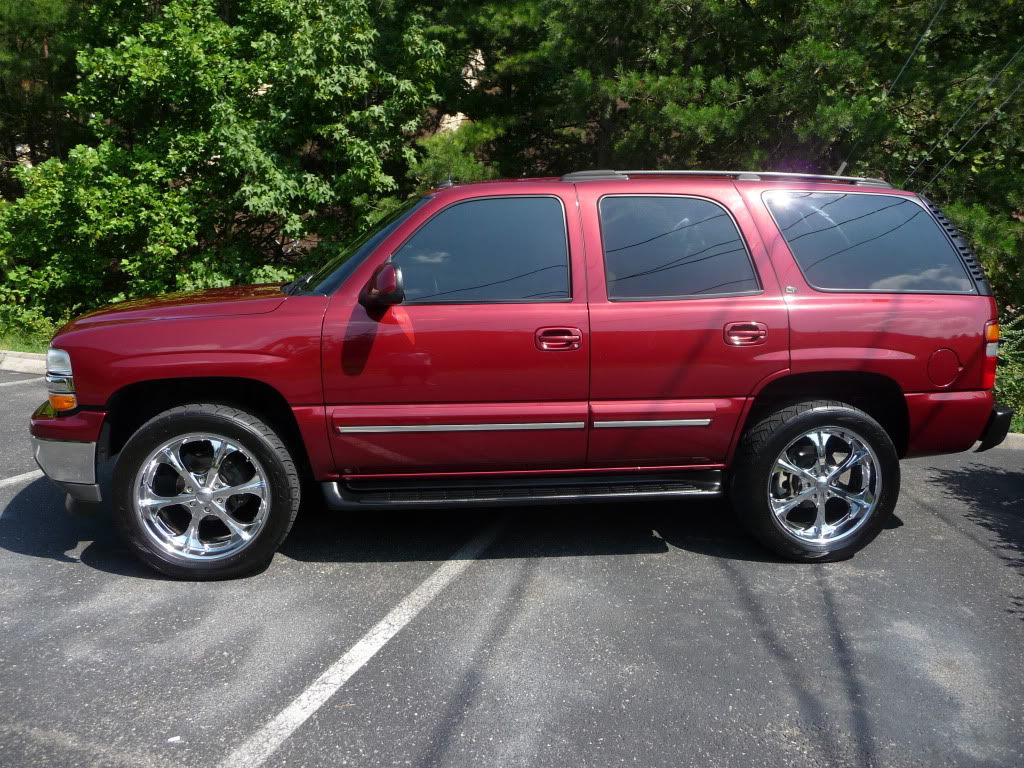
http://i126.photobucket.com/albums/p116/jamisonstroupe/P1010490.jpg
After-
http://i126.photobucket.com/albums/p116/jamisonstroupe/CustomTahoe-NoBumperBoardsSlammed2.jpg
Dropped it, Shaved Roof Rack/Onstar Antenna, Changed the Tails, Smooth Rear Vent Caps, Shaved Rear Bumper (roll pan), Removed Running Boards
Effeckt
08-28-2009, 01:56 AM
Much improved IMO. Now lets see these mods for real! :)
BlackDenali
08-28-2009, 09:30 AM
Looks sick! You should remove the side moldings aswell!!
brndns_hoe
08-28-2009, 09:54 AM
sick man, get her done!
05nali
08-28-2009, 10:31 AM
how'd you do that? what software?
Effeckt
08-28-2009, 11:53 AM
Looks sick! You should remove the side moldings aswell!!
+1
vatahoelt
09-02-2009, 10:49 AM
how'd you do that? what software?
he used paintbrush to edit it. sort of a jr photoshop program.
tybardy
09-02-2009, 11:21 AM
Jr. photoshop is an understatement... photobucket has a lot of neat tools that will allow you to do this as well
blueflamed03
09-02-2009, 11:38 AM
looks great man, love that color!
MikeTheApeman
09-02-2009, 01:03 PM
You guys wanting to do stuff should go out and grab GIMP (Graphic Image Manipulation Software). Similar to Photoshop and free.
Jamison
09-06-2009, 11:48 PM
You guys wanting to do stuff should go out and grab GIMP (Graphic Image Manipulation Software). Similar to Photoshop and free.
Just downloaded that program and it looks great. I've got a lot to learn though. Any quick tips to help?
ecordell
09-09-2009, 08:05 AM
GIMP is one of the best. Quick tip - just start playing lol, you'll figure it out soon enough. Take high resolution pics and it is way easier to edit them. I have a graphics design / computer repair business on the side and GIMP is what I use.
MikeTheApeman
09-09-2009, 08:25 AM
If i remember right, a lot of what GIMP has is the same as Photoshop. I'm sure there's tutorials out there that will help you learn, but ecordell is right - best way to learn is just playing around with it.
05nali
09-09-2009, 08:47 AM
i cant figure gimp out for crap. what do i use to drop, remove rear bumper and roof racks, and change the tails?
MikeTheApeman
09-09-2009, 08:58 AM
i cant figure gimp out for crap. what do i use to drop, remove rear bumper and roof racks, and change the tails?
I don't know the specific tools in GIMP, but I'll tell you how I'd do it in Photoshop. Should be similar.
Use the eraser to get rid of the bumper and roof racks.
Find a picture of the tails you want. Use whatever select tool you choose to grab only the tails, copy, switch back to your truck, paste, then move and resize to fit.
To drop, select the entire truck except the wheels, then use the move tool to bring it down. (TIP: Holding the shift key while moving in PS allows whatever you're moving to stay in line.)
05nali
09-09-2009, 09:14 AM
how do you select the entire truck?
MikeTheApeman
09-09-2009, 09:28 AM
Very carefully with the lasso.
05nali
09-09-2009, 12:06 PM
here is my attempt. i got this far but i am having trouble lowering it with gimp. help!
can someone also try cleaning it up, thanks
http://i851.photobucket.com/albums/ab77/manningfan10/photoshoppednali2.jpg
02 Cat Cutter
09-15-2009, 08:21 AM
can you retain the factory hitch with a roll pan? I love the look of your truck, I want the roll pan so I can match it up with my ss valence, but I gotta tow my boat. nice work!
vBulletin® v3.8.7, Copyright ©2000-2012, vBulletin Solutions, Inc.